
CarGurus: Used & New Cars
CarGurus, IncAuto & Vehicles
4.811.64K Reviews
- Version
- 5.63
- Installs
- 10.00M
- Age Rating
- Everyone
Screenshots
Our Review of CarGurus: Used & New Cars
 Analysis by Appyee
When I’m comparing cars, I want to narrow the field without having to learn a new system just to browse. CarGurus: Used & New Cars is built around that practical job: searching for vehicles, weighing listings, and deciding which sellers are worth contacting. It suits people who want to explore both new and used cars in one place, especially when they are still working out what they can afford or which models fit everyday needs.
I see its strongest appeal in the way it combines a broad search with information intended to help shoppers judge a listing. That can make the early stages of buying feel less like guesswork. It is still a research and shopping tool, not a substitute for inspecting a car or checking the details that matter to you before committing, but it gives a buyer a useful place to start.
Browsing and Searching Made Easy
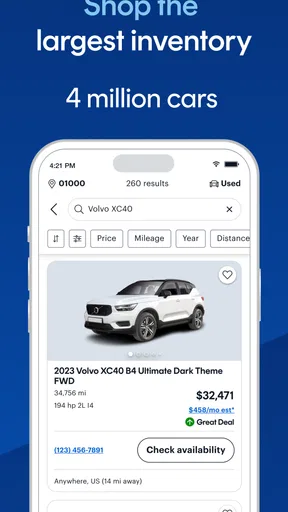
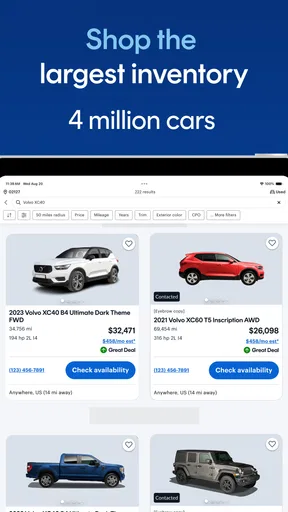
When you first open CarGurus: Used & New Cars, it greets you with a clean and intuitive interface. It’s super easy to navigate, which is a breath of fresh air in the sometimes cluttered world of car apps. Just plug in what you’re looking for, and boom – a list of options is at your fingertips.
The search filters are where the magic happens. You can get specific with make, model, price range, and even mileage. It’s like telling the app, “Hey, find me a red convertible under 50k miles,” and it actually does it! Super handy for zeroing in on exactly what you want.
For a first search, I would keep the filters broad enough to reveal alternatives rather than locking in every preference. If I search only for one exact trim, colour, and mileage ceiling, I may miss a nearby car that better fits my budget. I would first compare a few models and price ranges, then tighten the search once I understand what is realistically available. This is a small habit, but it makes the app more useful as a decision tool, not just a way to confirm a choice I already made.
CarGurus, Inc. makes this free auto-shopping app, and its scale is reassuring for a shopper who wants to see a substantial range of listings: it has over five million installs and an average rating of 4.8 from around 207,000 ratings. It is suitable for everyone, and the app’s current version is 5.18. It has been around since February 11, 2014, so it is not a brand-new experiment in car shopping. Those figures do not tell me whether a particular listing is right for me, but they do suggest that many people use the app as part of their search.
Detailed Listings and Price Analytics
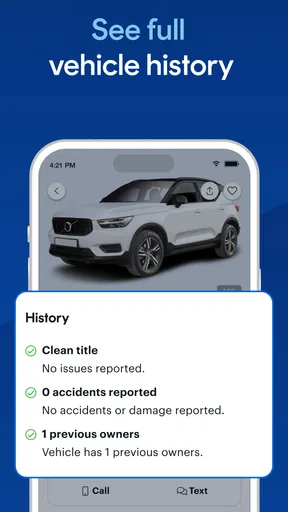
Once you find a car that catches your eye, tapping on it reveals a treasure trove of information. The listings are detailed, offering everything from vehicle history to dealer ratings. You’ll know if the car was in a fender bender or if it’s been pampered like a prince.
One of the coolest features is the price analysis tool. It uses algorithms to let you know if a car is a good deal or if you might be paying more than you should. It feels like having a savvy negotiator on your team.
I would treat that price signal as a starting point for questions, not a final verdict. A vehicle’s condition, equipment, service records, location, and the exact details of its listing can all affect what a fair price means. When a car looks unusually attractive, I would use the listing details to prepare specific questions for the seller and arrange an independent inspection before buying. When the assessment suggests a higher price, I would compare similar cars rather than assuming the seller will negotiate.
Connecting with Dealers
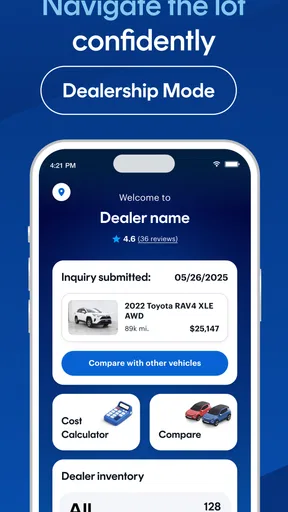
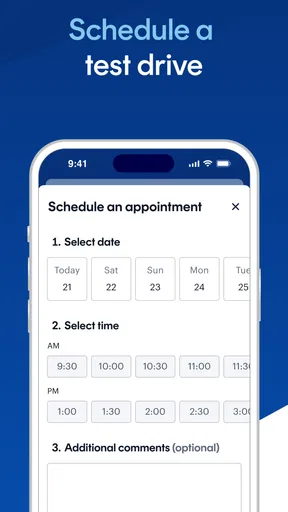
Found that perfect ride? The app makes it a breeze to connect with dealers. You can send messages directly through the app or even call them up if you’re feeling chatty. No more awkward dealership visits just to get basic info.
The messaging feature is smooth, and responses are usually quick. It feels like the app is working behind the scenes to make sure you’re getting the best service possible.
A useful way to make that contact count is to ask about the exact car in the listing, whether it is still available, and what information the dealer can share before a visit. I would also confirm any details that could change the decision, such as the vehicle’s condition and the next steps for seeing it. A message can save an unnecessary trip, but I would not treat a reply as a guarantee that a car will remain available or that every detail has been independently checked.
Readability, Access, and the Real-World Fit
What really sets CarGurus apart is its mix of powerful search tools and user-friendly design. It’s not just about finding cars; it’s about making sure you’re getting a good deal and understanding every aspect of your potential purchase. It’s like having a knowledgeable friend guiding you through the car buying maze.
And let’s not forget accessibility. Whether you’re chilling on the couch or sneaking in some car browsing during your commute, the app works seamlessly. It’s designed to fit into your life without making things complicated.
In practical use, I would do the focused parts of a search when I can give the details proper attention: narrowing filters, comparing listings, and reading the information attached to a car. If I am walking through a noisy place or travelling, I might use a short moment to save a possibility or note a question, then return to the listing later. That distinction matters because a quick glance is not the same as carefully checking a car’s history, price context, and seller response.
What the Search Experience Does Well
CarGurus is especially useful when I am not yet committed to a single make or model. Searching across a range of used and new cars lets me compare the compromises involved: a newer car against a lower-mileage used one, or a preferred model against a less familiar option that fits the budget better. It gives a shopper room to explore before arranging visits.
That makes it a good fit for someone replacing a car with time to research, a first-time buyer who wants to understand the market, or a household comparing several practical options. It is less compelling for someone who already knows the exact vehicle and seller they want, or who expects an app to complete every part of a purchase. In those cases, a dealer’s own inventory page or a direct call may be the quicker route.
Compared with general classifieds, the appeal here is the emphasis on car-specific details and price context rather than simply presenting a stream of ads. Compared with going straight to a dealership, it offers a way to compare options before travelling. Neither comparison removes the need to verify the vehicle in person: a polished listing can help with screening, but it cannot tell me how a particular car drives or whether its condition matches my expectations.
A More Careful Way to Shop
For a realistic example, imagine I need a dependable replacement but have not settled on a model. I would set a comfortable price range, search a few makes, and use mileage as a guide rather than an absolute measure. I would shortlist several cars, compare their listing details and price assessments, then contact sellers with questions that could rule out a wasted visit. If one option still looked promising, I would arrange to see it and have its condition checked before making a decision.
This workflow also helps prevent a common shopping trap: treating the first appealing listing as the benchmark. I would keep a small comparison set and note why each car remains in consideration. One may have a more attractive asking price, while another may look stronger on mileage or listing information. Keeping those trade-offs visible makes it easier to decide what I actually value instead of being pulled along by a single “good deal” label.
The app can also support a family conversation without requiring everyone to browse at once. I can bring a few concrete candidates to the discussion, explain what makes each one worth considering, and agree on questions to ask before contacting sellers. That is more useful than sending a long stream of listings with no context. For a buyer who is making a decision with someone else, a shortlist turns browsing into a shared, manageable process.
Where I Would Be Cautious
The main limitation is not the search itself but what any listing-based tool can establish. Price analysis helps frame a comparison; it does not prove that a car is mechanically sound, that its history is complete, or that the seller’s description answers every important question. I would use the app to decide what deserves further attention, then rely on direct questions, a proper viewing, and an inspection to judge the vehicle.
There is also a difference between browsing comfortably and navigating comfortably for every person. A clean layout can reduce clutter, but it does not guarantee that every user will find every screen easy to read or operate. Small text, dense listing details, and repeated scrolling can be tiring for someone with low vision, limited dexterity, or difficulty sustaining attention. I would take breaks, enlarge text through the device settings where helpful, and avoid trying to assess a complex listing while distracted.
For users who process information more easily in stages, the best approach is to separate the task: first set the search, then review one listing at a time, and only afterward compare prices and contact sellers. That reduces the mental load of switching between filters, vehicle details, and messages. Someone who relies on assistive technology should test the key actions they personally need—searching, reading a listing, and contacting a seller—on their own device before depending on the app for a time-sensitive purchase.
Who Should Choose It
I would recommend CarGurus to shoppers who want a free way to explore a broad mix of cars, use filters to cut down the options, and get some price context before reaching out to dealers. The app is most valuable when I have a few possible directions and want to turn them into a sensible shortlist. Its age rating is Everyone, and its focus on straightforward shopping makes it approachable for a wide range of buyers, though the complexity of a car purchase still calls for careful judgement.
I would skip it as my only source if I were looking for a guaranteed inspection, a complete buying service, or a substitute for talking to the seller. A person who needs very specific accessibility support may also prefer to compare the app with a mobile browser or another way of searching before building their whole process around it. The better choice is whichever method lets that person comfortably read, compare, and verify the information they need.
Final Thoughts on Inclusive Use
Overall, if you’re in the market for a car and want to simplify the process, CarGurus: Used & New Cars is definitely worth a download. It’s like having a car-buying assistant in your pocket, ready to help you find that perfect set of wheels without all the hassle.
My recommendation comes with one practical condition: use it to organize research, not to rush a purchase. The filters, listing details, dealer contact, and price analysis can make the search more focused, while a careful viewing and independent checks still matter. For me, that balance is what makes the app useful: it helps turn a broad, stressful search into a series of smaller decisions, while leaving the final judgement where it belongs—with the buyer.
Privacy and Permissions
See what permissions an app requests and how it handles your data.
- Location
- approximate location (network-based), precise location (GPS and network-based)
- Phone
- directly call phone numbers, read phone status and identity
- Photos/Media/Files
- read the contents of your USB storage, modify or delete the contents of your USB storage
- Storage
- read the contents of your USB storage, modify or delete the contents of your USB storage
- Camera
- take pictures and videos
- Wi-Fi connection information
- view Wi-Fi connections
- Device ID & call information
- read phone status and identity
- Other
- view network connections, full network access, control vibration, prevent device from sleeping, Google Play license check
Verdict
Strengths of CarGurus: Used & New Cars
- User-friendly interface for easy navigation.
- Comprehensive car listings and reviews.
- Detailed vehicle history and pricing insights.
- Advanced search filters for precise results.
- Reliable seller ratings and communication tools.
Limitations of CarGurus: Used & New Cars
- Limited private seller options.
- Some features require registration.
- Occasional outdated listings.
- Ads can be intrusive for free users.
- Limited customization of alerts.
Similar Picks in This Category
View All
Android Auto
Google LLC4.1

maxim — order a taxi & food
PT. SITO4.7

Штрафы ГИБДД: проверка с фото
Pays LLC – Штрафы ГИБДД4.7

Номерограм – проверка авто
Авто Ассист4.8

Дром Авто
Дром4.9

Frequently Asked Questions
What features does the CarGurus app offer for car buyers?
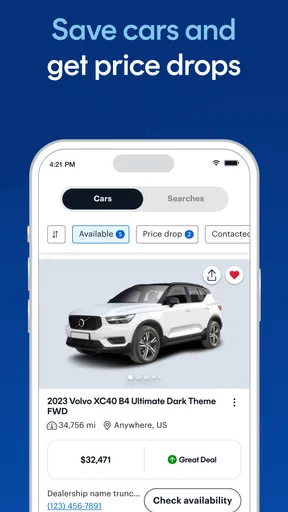
The CarGurus app provides several features for car buyers, including advanced search filters to find new and used cars, price analysis to determine fair deals, and user reviews for insight into vehicles and dealerships. Additionally, it offers tools to compare prices, save searches, and receive alerts for price drops on favorite listings.
Is the CarGurus app free to use, or are there any hidden costs?
The CarGurus app is free to download and use, offering many features without any charges. However, while browsing and comparing vehicles is free, some premium features or detailed reports might require in-app purchases or subscriptions. Always check the app for any additional fees associated with specific services.
How reliable are the car listings on CarGurus?
CarGurus aggregates listings from dealers and private sellers, providing a wide range of options. The app uses a proprietary algorithm to analyze prices and ensure they are competitive. While CarGurus strives for accuracy, it's always recommended to verify details directly with the seller and review the vehicle's history before making a purchase.
Can I sell my car using the CarGurus app?
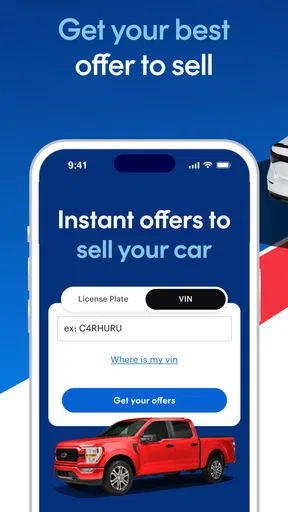
Yes, the CarGurus app allows you to list your car for sale. You can easily create a listing by uploading photos, entering vehicle details, and setting a price. The app also suggests a competitive price based on market data to help you sell your car quickly and efficiently.
Does the CarGurus app provide financing options for car purchases?
CarGurus partners with various lenders to offer financing options directly through the app. Users can explore different loan options, calculate monthly payments, and apply for pre-approval. This feature helps streamline the car buying process by providing a convenient way to manage financing without leaving the app.
